Contents |
|
|
|
|
|
|
|
|
|
|
|
|
|
|
|
|
|
|
|
| Better editors and development environments | |
|
|
Keyword: von Neumann Architecture
This introduction to computers and their architecture is very brief. It is no longer necessary or even possible to understand computers in every detail. This text aims only to provide a general idea of how programs and data interact within a computer.
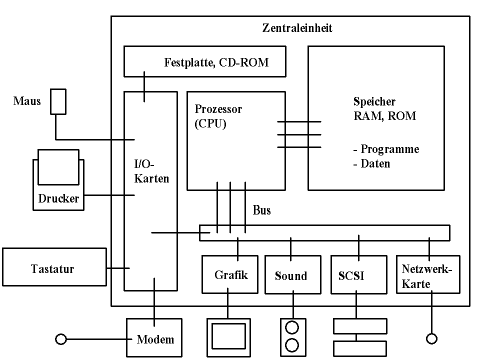
The central unit consists of
Peripheral devices are connected.
The peripheral devices are connected to the central unit, which is usually implemented on a single circuit board, the so-called mainboard , via interfaces (electrical or other connections) or bus systems .
Programs and data are both held in memory. Programs are loaded from the hard drive into memory. Data is generated by the programs or loaded from the hard drive (or floppy disk, CD-ROM, etc.).
A careful distinction must be made between data in memory and data on mass storage devices such as hard drives and CD-ROMs. The processor only has direct access to data in memory (RAM). Data from the hard drive must first be read via the interfaces.
The operating system is a program that is constantly available, although not all parts need to be present in memory; they can be loaded as needed. It is organized in layers of increasing complexity.
Basically, a program can do the following Use data areas . These two areas are made available to the program by the operating system at startup.
A program consists of a sequence of instructions that are executed by the CPU (central processing unit). Normally, this happens sequentially. However, there are jump instructions that are executed under certain conditions, allowing for loop processing. In this case, the processor repeatedly jumps back to the same point until a certain condition is met.
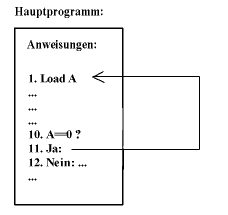
Another example of non-sequential program execution are subroutines .
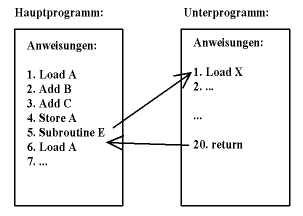
Subroutines are parts of a program that are called from different points and return automatically. The following data is placed on the stack:
The stack grows slightly with each subroutine call. Subroutines thus gain their own data area. This allows subroutines to call other subroutines, or even themselves. The data doesn't interfere with each other, and the processor always finds its way back to the point of call.
Multiple programs can be active simultaneously . The processor switches between the programs ( processes ) so quickly that it appears as if they are all running at the same time ( multitasking ). Java can create multiple threads within a single program , which are then executed by the processor virtually simultaneously. Switching from one process to another is more resource-intensive than switching from one thread to another within the same program.
The actual language that the processor understands, and in which programs are stored in memory, is called machine language . It is possible to program a computer directly in this language using an assembly language . However, this is extremely cumbersome and unproductive. Furthermore, machine language is processor-dependent (not portable ).
There are now two ways to bypass machine language.
There are also hybrid systems that first translate into bytecode and then interpret it. This has advantages over the extremes described above.
Java also uses a compiler, a so-called just-in-time (JIT) compiler , which further processes the bytecode. Therefore, Java's execution is on par with more machine-level programming languages like C.
The fundamental task of a programming language is to reduce complexity. In the simplest case, this involves a sequence of machine instructions.
Load P in Register 1
Load I in Register 2
Multiply I by 8
Add Register 2 to Register 1
Load X in Register F
Store X at the Address in Register 1
in a single instruction
P[I]=X;
In summary, the next stage of reduction involves grouping instructions into subroutines that are accessible from any point. This reduces the instruction sequence.
S=0;
for (i=0; i<P.length; i++) S=S+P[I];
(which calculates the sum of the numbers in a vector) to a single command
S=sum(P);
summarized.
Object-oriented programming (OOP) further reduces complexity by grouping data and associated subroutines into objects. Java is an object-oriented language.
The complexity could be reduced even further by grouping objects into entire program modules that use predefined communication methods. This is implemented in visual programming (e.g., with Java Beans).
The data on the hard drive is organized into files . These files are managed by the operating system as a whole. The files are, in turn, grouped into directories . Directories can contain other directories, creating a hierarchical order of directories. At the top is the root directory of a drive.
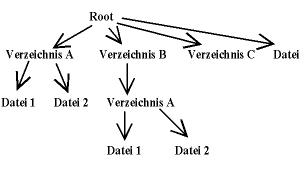
Unix systems use a single, large directory tree. Drives on remote computers simply appear as part of this tree under a directory name. They are mounted there.
In Windows, each drive is assigned a drive letter A, B, C, etc. This means that the full names of files begin with the drive letter followed by a colon.
The individual files have names that follow different conventions depending on the operating system. For example, a complete name under Windows looks like this:
C:\MYFILES\FILE.TXT
This would be the file named FILE.TXT in the MYFILES directory on the hard drive (drive) C. The part after the last dot ( txt ) is called the file extension.
Spaces are allowed in filenames, as in
C:\My Documents\First File.txt
This causes problems when called from a command line. The file must then be enclosed in quotation marks. Under UNIX, a typical file is called...
/home/mga010/My_Files/first_file.txt
The separator that separates the directory names from each other and from the files is / in Unix and \ in Windows, and the drive letter is omitted in Unix.
There are also relative names. These assume that a current directory is set. For example, if /home/mga010 is the current directory, then it is referred to as...
My_Files/first_file.txt
The same file as in the example above. In addition, there is the parent directory, which is indicated by two dots.
../test.txt
This refers to the file test.txt in the parent directory of the current directory. It looks the same in Windows. The current directory is indicated by a dot (.).
The operating system assigns a current directory to each program that is launched. The program can change this directory and thus access files relative to it. Remember that access to files within a program always occurs through routines of the operating system.
The first program you encounter on UNIX is the command line (command shell). On Windows or a graphical UNIX interface, such a command line can also be accessed with a single mouse click. There, it's called the command prompt .
However, the command line is increasingly being replaced by graphical user interfaces (GUIs), which offer a much more intuitive user experience. For our purposes, though, knowing the most important commands is very useful, as controlling the Java compiler from the command line is the easiest way to start.
You start the command line in Windows via the Command Prompt icon. The window shown below will open. Normally, the text before the blinking cursor displays the current path. Commands are entered after the > character. Pressing the Return key executes the commands. The executed command may display output below the input line.
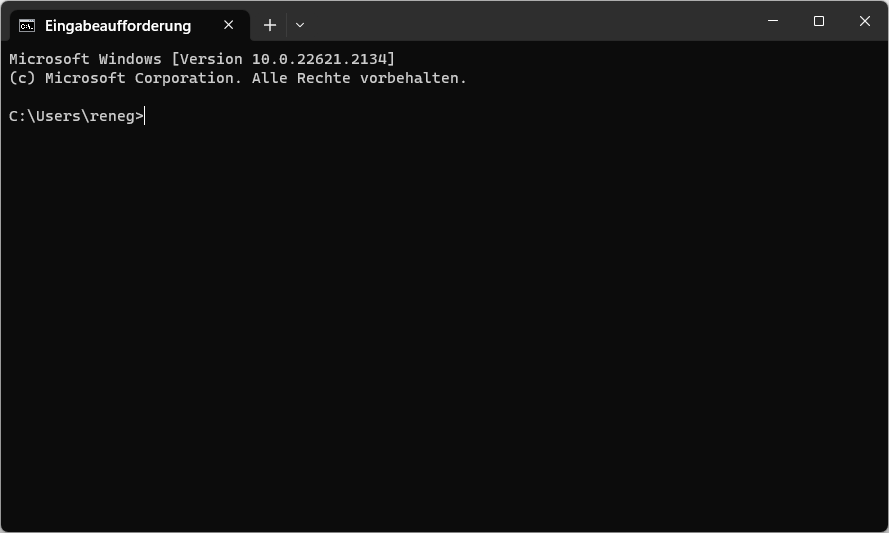
The command line
She can in this way
The following explains some important commands for UNIX (and their Windows equivalents). Hundreds of books exist on this topic, especially for UNIX, because the shell there offers far more possibilities than the command prompt in Windows.
First, you can use
ls
List the files in the current directory. The corresponding Windows command is `dir` . If you only want to list specific files, you can apply a filter.
ls *.java
This lists the names of all files ending in .java . To get more information, use...
ls -l *.java
In UNIX, options are specified using a minus sign. In Windows, options are specified with a trailing slash (/), e.g.,
dir *.java /p
The files are loaded page by page, pausing after each page and waiting for a key press. Help is available on UNIX with...
man ls
and under Windows with
help dir
You can copy, rename, and delete files directly using the command line. The corresponding commands under UNIX are:
cp file.txt file.bak
mv file.txt other-name.txt
rm file.txt
( copy , ren , and del in Windows). This allows you to move entire groups of files, for example.
cp *.txt ../backup
This copies all files with the extension .txt into the directory backup , which must be a subdirectory of the parent directory.
To change the current directory, you use...
cd directory
You can create directories with
mkdir directory
( md under DOS) create and with
rmdir directory
Delete them if they are empty. Delete full directories with
rm -r directory
under UNIX, and with
rmdir /S directory
in Windows ( Caution! ).
Of course, you can also run programs from the command line. To do this, you enter the program name followed by the parameters. Since not all programs you might want to run are in the current directory, a search path exists. The path is organized differently under Windows and UNIX, but it always consists of a list of directories to be searched. You can find the path under DOS with
path
und mit
echo $PATH
unter UNIX. Um ihn zu ändern, muss man unter DOS etwa
path %PATH%;c:\java\bin
eingeben. Dies erweitert den Pfad um ein Verzeichnis c:\java\bin. Unter UNIX sieht dies so aus
PATH=$PATH:/software/jdk/bin
Dies soll vorerst als Erklärung der Kommandozeile genügen.
Vor der Erstellung des ersten Java-Programms muss man sicher stellen, dass Java auf dem Rechner korrekt installiert ist, und zwar das Java Development Kit (JDK).
Falls Sie Linux verwenden, so ist dieses Kit möglicherweise in Ihrer Distribution enthalten, und sie brauchen es nur als Paket aufzurufen.
Unter Windows laden Sie sich bitte das inzwischen recht große Installationsprogramm vom Server von Oracle herunter und installieren es als Administrator. Verwechseln Sie das Paket nicht mit dem Java Runtime Environment (JRE), das für unsere Zwecke nicht genügt und im Development Kit enthalten ist.
Mit Hilfe der Kommandozeile und eines Editors kann man das erste Java-Programm erstellen. Wir verwenden folgende Version von "Hello World".
public class HelloWorld
{
    public static void main (String args[])
    {
        System.out.println("Hello World");
    }
}
Dieser Text muss nun in eine Datei HelloWorld.java gespeichert werden. Zum Erstellen einer solchen Datei verwenden wir einen Editor, wie etwa Notepad. Am einfachsten startet man den Editor mit der graphischen Benutzeroberfläche oder mit einer Kommandozeile, wie etwa unter Windows mit
notepad HelloWorld.java
Dies startet das Programm notepad mit dem Parameter HelloWorld.java. Notepad fragt hier nach, ob es eine neue Datei dieses Namens erstellen soll. Unter Unix stehen ebenso einfache Editoren zur Verfügung. Berühmt ist der sehr einfache Editor "vi" unter Unix, oder auch der sehr komplexe Editor "emacs".
Dann muss man den Text eingeben, ohne Fehler einzubauen. Mit Hilfe des Speicherkommandos des Editors wird der Text in das aktuelle Directory unter dem Namen HelloWorld.java abgespeichert werden.
Danach wird das Java-Programm kompiliert. Dies kann in einer Kommandozeile erfolgen.
javac HelloWorld.java
Dabei muss javac in einem Verzeichnis im Pfad sein, was nach der Installation des Java Development Kits normalerweise der Fall sein sollte. Falls nicht, muss man den vollen Namen eingeben oder den Pfad verändern (siehe oben). Achten Sie darauf, dass die Datei vom Editor tatsächlich unter dem Namen HelloWorld.java abgespeichert wurde. Insbesondere notepad nennt die Datei gerne in HelloWorld.java.txt um.
The compiler now creates a file named HelloWorld.class , which contains the bytecode. The program can then be executed as follows.
java HelloWorld
The Java program must again be included in the path. Under Windows, this looks like this.
...>javac HelloWorld.java

...>java HelloWorld
Hello World!

...>
If there are errors in the program, they will be output after the compiler is called. The program must then be corrected accordingly.
It's not ideal to use Notepad or a similarly basic Unix editor. A more powerful editor that offers syntax assistance and automatically launches programs and compilers is a better alternative. On Unix, you can use Emacs. On Windows, Notepad++ is a good editor, as is JE, written by the author of this course.
However, it is recommended to use better environments for Java. The author uses Eclipse, which you can download here . This environment requires some initial training. An alternative is BlueJ .